Search for the Needle Codes & Guide (November 2026)
Claim 3 active Search for the Needle codes for 240+ Gems and bonus Desert rewards to upgrade detection tools and clear tricky stages.
What Is Search for the Needle & What Do Codes Unlock?
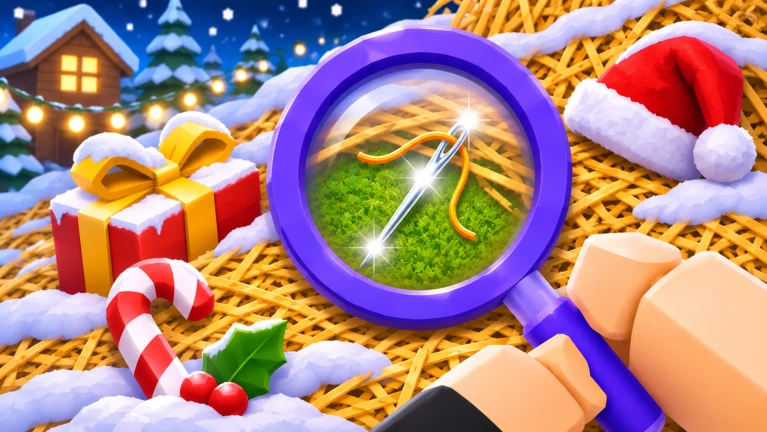
Search for the Needle takes the classic needle-in-a-haystack idiom literally, turning dense themed arenas—from golden gardens to sweeping desert dunes—into chaotic Roblox scavenger sprints where sharp eyes, faster digging/search gear, and clever scanning perks help you spot the tiny prize before rival hunters.
While 7 older codes have already expired, 3 working codes remain live today: POTION and GARDEN deliver 120 Gems each (240 Gems combined), while Desert drops bonus themed rewards. Claiming all three right after finishing the intro hands fresh hunters an immediate Gem cushion for helpful radar or speed upgrades.
Invest early currency drops into featured banner guarantees, permanent upgrades, or core gear instead of single-use consumables.
Redeem limited-time bonus codes promptly before the next content patch retires them.
Where to Go & How to Redeem Search for the Needle Codes
Clear the quick opening search prompt, then check the right-side HUD icons for the Gift Box, Twitter bird, or Settings / Codes dialog.
Right-side HUD Gift Box / Twitter bird / Settings icon opening the Search for the Needle redemption field.
Finish the brief opening tutorial first (Rank 1+).
Claimed Gems and Desert rewards credit directly to your main HUD Gem balance and gear inventory.
Step-by-Step Redemption Route
- 1Launch Search for the Needle and clear the brief introductory tutorial round.
- 2Click the Gift Box, Codes, or Settings icon located along the right-side HUD.
- 3Enter POTION, GARDEN, and Desert (preserving title case on Desert) into the text bar.
- 4Press Confirm to bank your 240+ Gems and bonus rewards before jumping into the next arena.
Code Not Working? Quick 4-Point Fix
- ✓Check exact letter casing: promo code boxes are usually case-sensitive, so use our Copy button directly.
- ✓Remove extra trailing spaces when pasting on mobile keyboards or web redemption portals.
- ✓Restart the game client or join a fresh server if a brand-new patch code fails right after release.
- ✓Confirm tutorial completion, minimum rank requirements, or check your in-game Mailbox if rewards don't appear instantly.
All Working Search for the Needle Codes
GARDENItem / Bonus120 gems
POTIONItem / Bonus120 gems
DesertItem / Bonusrewards
Investing 240 Free Gems Into Sharper Search Upgrades
Starting out with 240 Gems from POTION and GARDEN plus the bonus drop from Desert puts practical utility upgrades within reach before you grind dozens of public rounds. Prioritize upgrades that directly shrink search uncertainty—expanded clearing radius, stronger proximity hints, movement speed boots, or wider sweeping tools—over pure avatar flair.
Every extra second shaved off combing dense foliage or sand piles swings tight public rounds where twenty players swarm the same haystack simultaneously. Investing early Gems into functional speed and scan perks pays back steady round-win payouts across every subsequent map rotation.
- Remember title case on Desert versus ALL CAPS on POTION and GARDEN so all 3 active drops claim cleanly.
- Put your 240 free Gems toward clearing speed, reach, or hint utilities before buying purely cosmetic skins.
- Hold back any extra Gems whenever a brand-new map biome update is teased.
Spotting Needles Faster in Crowded Garden and Desert Maps
Winning consistently in Search for the Needle comes down to systematic grid sweeping rather than racing randomly behind loud crowds. Adjust your Roblox camera angle steeply downward and zoom slightly closer than usual when sifting thick grass or sand mounds—tiny metallic glints and mismatched hitboxes stand out far more sharply from an overhead perspective.
Work outer edges and neglected map corners first while half the server piles blindly onto the dead center. Because needles spawn across wide zones, checking overlooked perimeters systematically lets you snag uncontested discoveries cleanly before the clock winds down.
- Tilt your camera downward at a steep angle so thin metallic needles contrast clearly against ground textures.
- Sweep outer perimeter corners systematically instead of fighting ten players in the crowded center pile.
- Listen closely for proximity pings or interaction prompts while gliding across dense props.
Pro Tips to Maximize Search for the Needle Rewards
Keep Desert Title-Cased
Enter Desert with only the D capitalized, while submitting POTION and GARDEN in ALL CAPS for 240 Gems.
Use Top-Down Scanning
Angling your camera nearly straight down reveals tiny hidden needles buried in garden brush and desert dunes.
Buy Clearing Speed First
Spend code Gems on wider sweep reach and hint tools so you beat rival hunters to every discovery.
How to Get More Free Rewards in Search for the Needle
Waiting for the next developer code drop? Here are the best legitimate ways to earn extra rewards in-game every week:
Round Wins and Speed Bonuses
Finding needles rapidly in public lobbies pays out repeatable Gems and coins toward higher-tier search gear.
Daily Search Objectives
Completing daily discovery streaks and themed map clears awards steady extra Gems between patches.
New Biome Releases
Fresh map environments (like Garden and Desert) regularly launch alongside new 120-Gem celebration codes.
Search for the Needle Codes FAQ
How many Gems do active Search for the Needle codes give?▾
POTION and GARDEN award 120 Gems each (240 Gems total), while Desert grants bonus themed rewards.
Where do I enter Search for the Needle codes?▾
After clearing the quick tutorial, click the Gift Box, Twitter bird, or Settings icon on the right-side HUD.
Why did Desert fail when I typed it in uppercase?▾
Desert uses title case (capital D, lowercase rest), unlike uppercase codes POTION and GARDEN.
Do Search for the Needle codes expire?▾
Yes—7 earlier codes have already expired, so redeem active biome drops while they remain live.
Expired Search for the Needle Codes (7)Toggle Archive
These older codes have been deactivated by the developers. We archive them so you can quickly confirm why an old code returns an error.