Raise The Biggest Family Codes & Guide (November 2026)
Expand your dream household faster with 3 active Raise The Biggest Family codes awarding 650 Coins and 105 Diamonds for home, pet, and supermarket upgrades.
What Is Raise The Biggest Family & What Do Codes Unlock?
Raise The Biggest Family puts a cozy, bustling twist on Roblox life-management tycoons, challenging players to expand a modest home into a lively multi-generational estate stocked with supermarket groceries, adorable household pets, and upgraded rooms. Growing family size accelerates household income so every expansion snowballs smoothly.
All 3 tracked codes are active right now with zero expired entries—covering RELEASE, PETS, and SUPERMARKET—depositing 650 Coins and 105 Diamonds straight into your household budget right after your opening setup. Claiming all three inside the Shop gives your starter home immediate capital for extra rooms, helper pets, and grocery runs.
Invest early currency drops into featured banner guarantees, permanent upgrades, or core gear instead of single-use consumables.
Where to Go & How to Redeem Raise The Biggest Family Codes
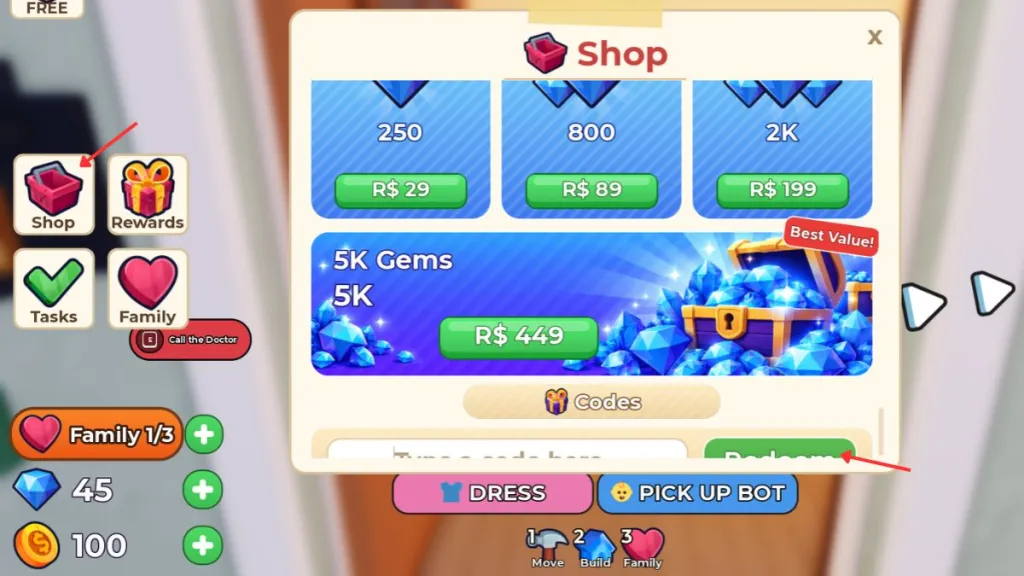
Spawn inside your home lot in Raise The Biggest Family and open the In-game Shop menu along the left-side or right-side HUD.
Select the Shop / Store icon and scroll inside the store window to reach the promo code entry bar.
Minimum Level 1 after completing the short introductory household tutorial.
Claimed Coins and Diamonds add directly onto your top household currency counters for instant room, pet, and grocery upgrades.
Step-by-Step Redemption Route
- 1Launch Raise The Biggest Family on Roblox and finish the quick starter home walkthrough.
- 2Click the Shop / Store button anchored along the left-side or right-side HUD.
- 3Scroll to the Codes input bar inside the Shop overlay and enter SUPERMARKET, PETS, and RELEASE in ALL CAPS.
- 4Confirm each submission to collect 650 Coins and 105 Diamonds immediately.
Code Not Working? Quick 4-Point Fix
- ✓Check exact letter casing: promo code boxes are usually case-sensitive, so use our Copy button directly.
- ✓Remove extra trailing spaces when pasting on mobile keyboards or web redemption portals.
- ✓Restart the game client or join a fresh server if a brand-new patch code fails right after release.
- ✓Confirm tutorial completion, minimum rank requirements, or check your in-game Mailbox if rewards don't appear instantly.
All Working Raise The Biggest Family Codes
PETSNEWItem / Bonus200 Coins and 50 Diamonds
SUPERMARKETNEWItem / Bonus200 Coins and 50 Diamonds
RELEASEItem / Bonus250 Coins and 5 Diamonds
Turning 650 Coins and 105 Diamonds Into Faster Family Growth
Diamonds are considerably harder to gather early on than routine Coins, which makes the 105 free Diamonds across SUPERMARKET (50), PETS (50), and RELEASE (5) the true highlight of this starter bundle. Resist burning Diamonds on minor cosmetic furnishings before scouting permanent income perks, pet helpers, or capacity expansions.
Meanwhile, funnel your 650 free Coins directly into revenue-generating household upgrades—extra rooms, kitchen and supermarket supply stations, and new family additions—so passive Coin flow accelerates immediately. The faster your household headcount climbs, the quicker your estate pays for itself.
- Spend your 650 Coins immediately on income-multiplying rooms and family slots.
- Hold your 105 Diamonds for high-impact pets, permanent utility boosts, or premium upgrades.
- Keep supermarket supplies stocked so household productivity never dips during busy stretches.
Balancing Pet Bonuses, Supermarket Trips, and Room Upgrades
True to the latest update themes—Pets and Supermarket—your estate thrives when every wing supports the others. Pets frequently provide steady passive buffs or cheerful income bonuses that run nonstop while you manage groceries and unlock upper floors, making early pet unlocks pay dividends over hours of play.
Build a clean expansion cadence: harvest household earnings regularly, check supermarket stock so every family member stays happy and productive, then reinvest straight into the highest-return room or pet upgrade available rather than hoarding idle Coins. Consistent reinvestment compounds your passive income far faster than waiting on huge lump sums.
- Prioritize upgrades that add active earners or pet multipliers ahead of purely cosmetic decor.
- Batch supermarket restocking trips between major room purchases to minimize downtime.
- Watch future content updates—major room or feature additions reliably arrive with 50-Diamond codes.
Pro Tips to Maximize Raise The Biggest Family Rewards
Guard Your 105 Free Diamonds
SUPERMARKET and PETS grant 50 Diamonds each—invest them in lasting pet helpers or permanent utility upgrades.
Redeem Inside the Store Overlay
Look inside the In-game Shop menu along the side HUD rather than searching for a separate bird icon.
Keep Household Coins Moving
Spend your 650 starter Coins on income-generating home expansions right away so earnings compound faster.
How to Get More Free Rewards in Raise The Biggest Family
Waiting for the next developer code drop? Here are the best legitimate ways to earn extra rewards in-game every week:
Growing Family Passive Income
Each new family member and upgraded room steadily multiplies your baseline Coin stream every minute.
Playtime Gifts and Daily Check-Ins
Staying active around your home unlocks periodic chests awarding bonus Coins and occasional Diamonds.
Feature Update Code Drops
New theme updates like Pets and Supermarket consistently launch alongside generous 200-Coin and 50-Diamond codes.
Raise The Biggest Family Codes FAQ
What rewards do active Raise The Biggest Family codes provide?▾
All 3 active codes combine for 650 Coins and 105 Diamonds (200 Coins + 50 Diamonds each from SUPERMARKET and PETS, plus 250 Coins + 5 Diamonds from RELEASE).
Where do I enter promo codes in Raise The Biggest Family?▾
Open the In-game Shop / Store menu from the left or right HUD rail and scroll to the built-in code input bar.
Are any Raise The Biggest Family codes expired?▾
No—all 3 tracked codes remain live right now.
Do I need to expand my house first before claiming codes?▾
Just complete the short opening tutorial at Level 1 and you can redeem all three codes immediately.