Power a City Codes & Guide (November 2026)
Updated regularly with 1 active Power a City code focused on bonus rewards, alongside verified redemption routes and progression advice.
What Is Power a City & What Do Codes Unlock?
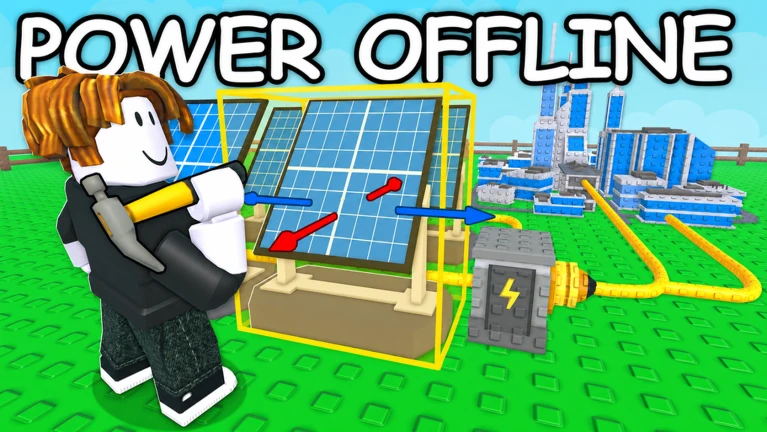
Resource pacing sits at the heart of Power a City, a community-driven online game packed with developer updates, milestone celebrations, and collectible in-game bonuses. Claiming verified developer codes hands you a clean head start on bonus rewards without breaking your play rhythm.
Our live checklist currently tracks 1 active Power a City code featuring bonus rewards. Standout drops in the current pool include rewards.
Every entry is checked against live developer updates and paired with a built-in browser tracker to mark claimed codes as you go.
Redeem limited-time bonus codes promptly before the next content patch retires them.
Where to Go & How to Redeem Power a City Codes
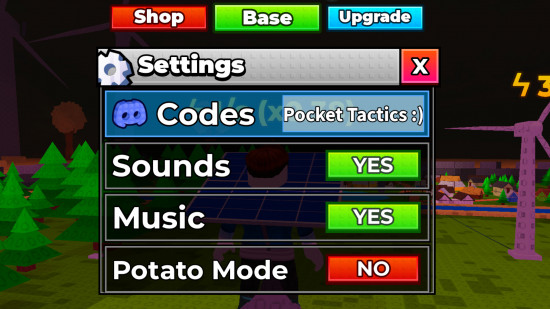
Enter the main Power a City lobby and inspect the top-right corner of the screen for the Codes or Settings panel.
Settings Gear icon on the HUD menu bar
Generally unlocked from Level 1 right after completing any brief opening tutorial.
Claimed currencies, boosts, and items credit directly to your HUD balance, inventory, or loadout.
Step-by-Step Redemption Route
- 1First reach Level 1 and finish the opening tutorial, then start Power a City on Roblox so your main HUD controls finish loading on screen.
- 2Locate the Settings Gear icon along the top-right corner of the screen to pop open the code entry window.
- 3Grab a live Power a City code from the table above and enter it verbatim into the text field, watching closely for look-alike characters like zero and 'O'.
- 4Hit Redeem or Confirm to claim your free Power a City bonuses immediately in your HUD balance, inventory, or upgrade menu.
Code Not Working? Quick 4-Point Fix
- ✓Check exact capitalization: Most game code boxes are strictly case-sensitive. Use the Copy button to paste cleanly without typos.
- ✓Trim trailing spaces: Pasting on mobile sometimes adds an invisible space at the end, so remove any extra blank character before confirming.
- ✓Check server, region, or client version: Brand-new patch codes may require restarting the client, updating the app, or joining a fresh server.
- ✓Verify minimum rank or expiry: Many games require finishing the opening tutorial, hitting a starter rank, or checking your in-game Mailbox; otherwise verify whether the code moved into the Expired Archive.
All Working Power a City Codes
CITY13Item / Bonusrewards
Best Redemption Order to Maximize Your Power a City Free Rewards
Working through 1 active Power a City code in the right order ensures every drop compounds cleanly. Start by redeeming permanent items, crates, and currency bundles so your baseline gear or inventory expands before you enter tougher matches.
Because the current batch emphasizes bonus rewards (1 code), build your next play session around them: Redeem limited-time bonus codes promptly before the next content patch retires them. For example, recent active drops featuring rewards work best when paired with your main progression loop.
- Claim permanent items, crates, and currency bundles first while standing safely in the main lobby.
- Save timed multipliers or luck buffs until you are positioned in your highest-yield farming area.
- Keep rare reroll or respec codes in reserve until you unlock stronger mid-game gear or tiers.
Sustaining Free-to-Play Progression in Power a City After Claiming Codes
Promo codes provide an immediate surge, but consistent progress in Power a City comes from pairing those drops with repeatable in-game rewards. Daily login calendars, group reward chests, milestone quests, and seasonal patch events provide reliable freebies between developer code releases.
Whenever a new update drops, head straight for the Settings Gear icon on the HUD menu bar to claim fresh strings early. Claimed currencies, boosts, and items credit directly to your HUD balance, inventory, or loadout. If a newly published code fails right after patch launch, rejoin a fresh server or restart the client so your session runs the latest version.
- Redemption Checkpoint: Enter the main Power a City lobby and inspect the top-right corner of the screen for the Codes or Settings panel.
- Unlock Check: Generally unlocked from Level 1 right after completing any brief opening tutorial.
- Stay Consistent: Stack daily tasks, event milestones, and verified code drops together rather than relying on one source alone.
Pro Tips to Maximize Power a City Rewards
Maximize Your Bonus Rewards (1 Code)
Redeem limited-time bonus codes promptly before the next content patch retires them.
Redeem Newly Added Codes First
Developer milestone codes often expire within days of an update. Start with any code marked NEW at the top of the list and check them off as you go.
Save Timed Multipliers for Active Play
If a code grants temporary double currency, luck, or EXP, claim it only when you have 15–30 uninterrupted minutes to play.
Rejoin a Fresh Server After Updates
Brand-new codes released right after a patch sometimes fail on older public servers. Leave and rejoin so your lobby runs the latest build.
Follow Official Developer Channels
Many developers drop surprise milestone codes, livestream coupons, and bonus daily chests through their official community hubs and social channels.
How to Get More Free Rewards in Power a City
Waiting for the next developer code drop? Here are the best legitimate ways to earn extra rewards in-game every week:
Official Community Channels & Milestones
Developers for Power a City regularly drop fresh codes during version livestreams, download or like milestones, and holiday celebrations. Following official groups or social channels often unlocks bonus login perks too.
Major Patch Days & Seasonal Events
Big content updates and preview streams routinely carry the highest-value limited-time codes. Check back right on patch day so you never miss short-window drops.
Daily Login Streaks, Quests & In-Game Loops
Daily login calendars, group reward chests, milestone quests, and seasonal patch events provide reliable freebies between developer code releases.
Bookmark This Verified Tracker
We automatically re-check Power a City regularly, promote newly released codes to the top with a NEW badge, and move expired codes into the archive so you never waste time.
Power a City Codes FAQ
How many active Power a City codes are working right now?▾
There are currently 1 verified working Power a City code tracked on this page alongside 4 archived expired codes. The active batch centers on bonus rewards.
Where do I enter and redeem Power a City codes?▾
Enter the main Power a City lobby and inspect the top-right corner of the screen for the Codes or Settings panel. Look for the Settings Gear icon on the HUD menu bar. Claimed currencies, boosts, and items credit directly to your HUD balance, inventory, or loadout.
Why isn't my Power a City code working?▾
Promo codes in Power a City are typically case-sensitive and retire quickly after updates or seasonal events. Use our Copy button to avoid typos or trailing spaces, rejoin a fresh server if a patch just launched, or check whether the string moved into our Expired Archive. Also confirm any prerequisite: Generally unlocked from Level 1 right after completing any brief opening tutorial.
How often do developers release new Power a City codes?▾
Fresh Power a City codes usually arrive alongside major content updates, preview livestreams, holiday events, and community player milestones. We re-verify active entries regularly and tag newly spotted drops with NEW.
What is the best way to use bonus rewards from Power a City codes?▾
Redeem limited-time bonus codes promptly before the next content patch retires them. Every code listed on this page is an official developer release redeemed directly inside Power a City or via the publisher's official redemption portal.
Expired Power a City Codes (4)Toggle Archive
These older codes have been deactivated by the developers. We archive them so you can quickly confirm why an old code returns an error.