Backrooms Race Clicker Codes & Guide (November 2026)
Blast down eerie yellow corridors faster with 6 active Backrooms Race Clicker codes handing out 125+ free Wins for instant pet eggs and zones.
What Is Backrooms Race Clicker & What Do Codes Unlock?
Backrooms Race Clicker merges eerie liminal yellow hallways with frenetic Roblox speed-clicker racing, pitting runners against countdown timers to rack up top speed before sprinting down monster-lined tracks for Wins. Because Wins buy stronger pet eggs and unlock deeper Backrooms levels, an early stockpile completely changes your opening half-hour.
All 6 tracked codes are currently active with zero expired entries, pouring 125+ free Wins—from 5-Win starter gifts up to a hefty 50-Win GlassBridge drop—straight into your counter so you can hatch upgraded speed pets right away.
Redeem limited-time bonus codes promptly before the next content patch retires them.
Where to Go & How to Redeem Backrooms Race Clicker Codes
Spawn inside the Backrooms Race Clicker lobby corridor and look along the right-side HUD icons.
Select the Gift Box, Bird, or Settings gear button on the right panel to pull up the code submission box.
Minimum Level 1 after completing the short starter click-and-sprint tutorial.
Claimed Wins immediately add to your HUD Wins total, ready to spend at nearby pet egg stands and portal gates.
Step-by-Step Redemption Route
- 1Boot up Backrooms Race Clicker on Roblox and wrap up the brief first race tutorial.
- 2Click the Gift Box, Bird, or Settings icon positioned along the right-side HUD.
- 3Paste an active code cleanly—keeping mixed capitalization on GlassBridge and Release, and uppercase on HALLOWEEN and 7MILLIONVISITS.
- 4Hit confirm to deposit free Wins into your wallet immediately.
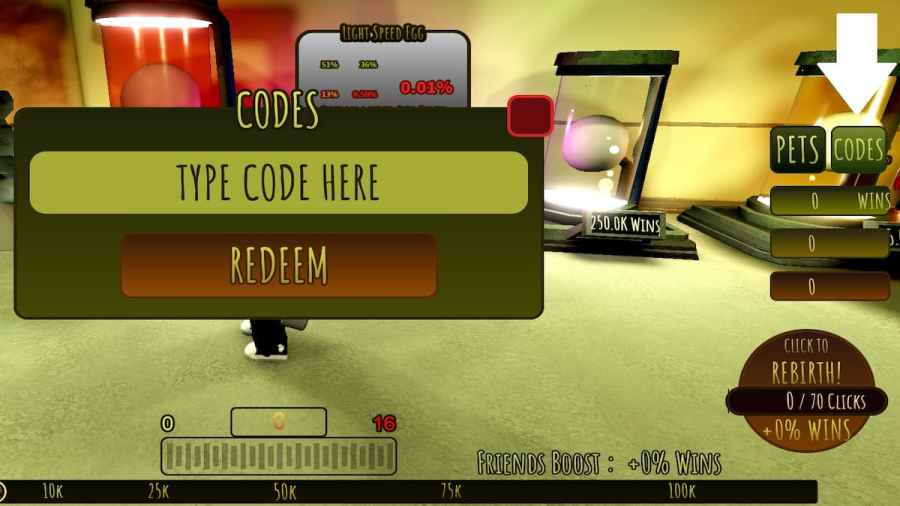
Code Not Working? Quick 4-Point Fix
- ✓Check exact letter casing: promo code boxes are usually case-sensitive, so use our Copy button directly.
- ✓Remove extra trailing spaces when pasting on mobile keyboards or web redemption portals.
- ✓Restart the game client or join a fresh server if a brand-new patch code fails right after release.
- ✓Confirm tutorial completion, minimum rank requirements, or check your in-game Mailbox if rewards don't appear instantly.
All Working Backrooms Race Clicker Codes
RedLightGreenLight—NEWItem / BonusRedeem for free Wins
ReleaseItem / BonusRedeem for 5 free wins
7MILLIONVISITSItem / BonusRedeem for 25 free wins
THANKZItem / BonusRedeem for 10 free wins
HALLOWEENItem / BonusRedeem for 35 Wins
GlassBridgeItem / BonusRedeem for 50 Wins
Converting 125+ Free Wins Into High-Multiplier Pet Teams
In any race clicker, raw finger clicking only carries you so far—your equipped pet team supplies the true multiplicative engine behind blistering corridor speeds. Claiming all six active codes (especially GlassBridge's 50 Wins, HALLOWEEN's 35 Wins, and 7MILLIONVISITS' 25 Wins) gives a brand-new runner enough capital to skip cheap starter eggs altogether.
Walk past the first basic egg stand and check the highest affordable pet egg inside your current world. Filling every active equip slot with stronger tier pets multiplies every pre-race click exponentially, letting you smash through finish gates that normally require twenty slow starter races.
- Redeem all six Win codes before hatching a single starter egg so you can afford higher-tier eggs immediately.
- Fill every pet equip slot first, then craft upgraded or golden variants once duplicates stack.
- Save enough Wins afterward to unlock the next Backrooms world gate rather than spending down to zero.
Timing Rebirths and World Portals Between Sprint Rounds
Each race cycle alternates between an intense pre-race speed-building countdown and a blistering sprint down the track. Never spend pre-race clicking seconds strolling through menus or opening eggs—do all your hatching, crafting, and rebirth shopping right after the race finishes or during calm lobby breaks.
Once your upgraded pet team effortlessly clears the current corridor, check rebirth requirements carefully. Early rebirths grant permanent speed and Win multipliers that quickly repay their Win cost, especially when paired with themed updates inspired by Glass Bridge and Red Light Green Light survival twists.
- Hatch eggs and manage pets between countdowns so you never miss pre-race click charging.
- Unlock deeper Backrooms zones early—their finish gates pay out far more Wins per sprint.
- Claim timed playtime chests along the lobby while waiting for the next race start.
Pro Tips to Maximize Backrooms Race Clicker Rewards
Buy Higher-Tier Eggs With Code Wins
Use the 50 Wins from GlassBridge and 35 from HALLOWEEN to jump straight past low-multiplier starter pets.
Trim Stray Dashes When Pasting
If RedLightGreenLight rejects with a trailing dash character attached, delete the dash and submit the clean letters.
Keep Hands Free for Pre-Race Clicking
Finish code redemptions and pet equips before the countdown starts so you hit every single speed click.
How to Get More Free Rewards in Backrooms Race Clicker
Waiting for the next developer code drop? Here are the best legitimate ways to earn extra rewards in-game every week:
World Gate Sprints and Rebirths
Clearing deeper Backrooms corridors and cycling rebirths multiplies your organic Win payouts every two minutes.
Playtime Gifts and Spin Wheels
Staying active in a lobby unlocks incremental gift boxes packed with extra Wins, speed potions, and bonus pets.
Group Member Auto-Hatch and Perks
Joining the official developer group frequently unlocks lobby perks like extra daily chests or pet luck boosts.
Backrooms Race Clicker Codes FAQ
How many Wins do the 6 active Backrooms Race Clicker codes grant?▾
Five codes list 125 confirmed Wins (50 + 35 + 25 + 10 + 5), plus extra free Wins from the RedLightGreenLight drop.
Where do I enter promo codes in Backrooms Race Clicker?▾
Click the Gift Box, Bird, or Settings gear icon along the right-side HUD in the lobby.
Are any Backrooms Race Clicker codes expired?▾
No—all 6 tracked codes remain active right now.
Why did GlassBridge or RedLightGreenLight give an error?▾
Verify Title Case spelling, make sure no stray dash or space slipped into the input bar, and finish the brief opening race tutorial first.